Your Bill
Reading Your Bill
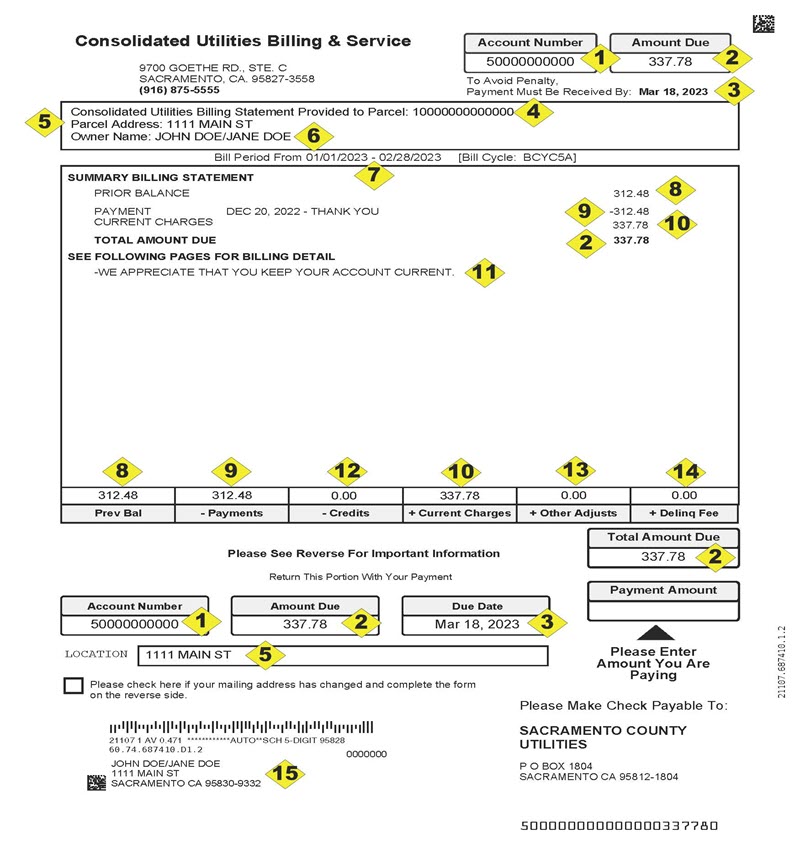
- Customer account number
- Total amount due - includes charges for all services both past due, current and any adjustments
- Due date - applies to current charges only and does not extend to any unpaid balance
- Parcel number for service address
- Service address
- Owner name
- Dates covered for billing period
- Prior balance from last statement
- Last payment amount and date received
- Current charges
- Customer message area - this space may be used to provide information messages for our customers
- Adjustments - miscellaneous credits
- Adjustments - miscellaneous debits
- Delinquent fees
- Customer name and mailing address - this may differ from the service address and may contain special instructions
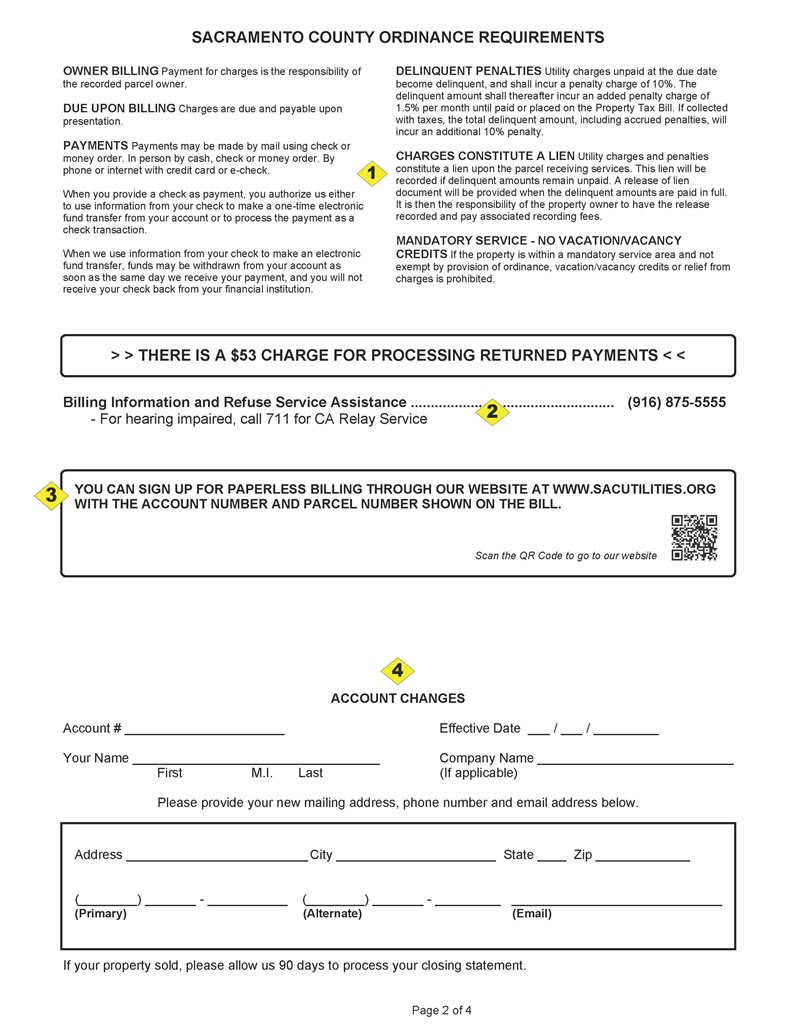
- County ordinance for billing and service
- Miscellaneous County telephone numbers
- Paperless billing instructions
- Change of mailing address form
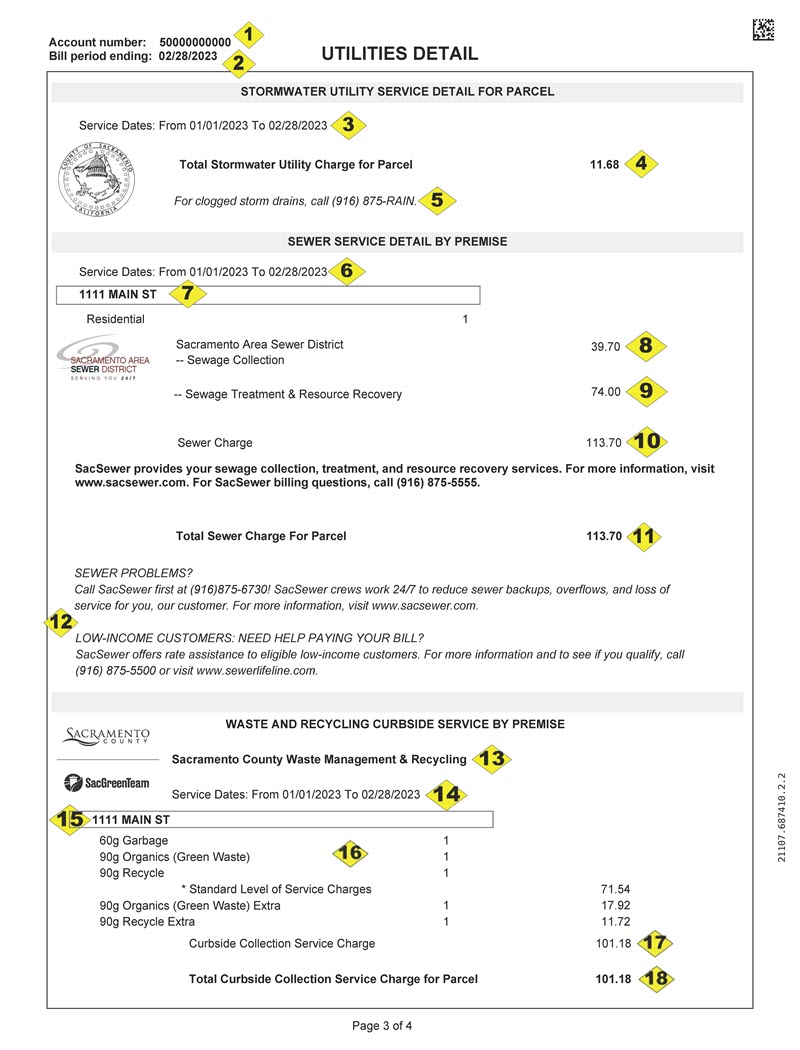
- Customer Account number
- Bill Period End Date
- Date range of Stormwater Utility billing
- Total current Stormwater Utility charges for parcel
- Stormwater Utility message area - this space may be used to provide important messages to our customers
- Date range of sewer billing
- Service address
- Local sewer charge for maintenance and upkeep of sewer pipelines
- Regional sewer charge for maintenance and upkeep for treatment of wastewater
- Total current sewer charge for service address
- Total current sewer charge for parcel
- Sewer message area - this space may be used to provide important messages to our customers
- Type of Waste Collection Service
- Date range of Refuse billing
- Service Address
- Description of Waste Collection commodities and number of carts for parcel
- Total current Waste Collection charge for service address
- Total current Waste Collection charge for parcel
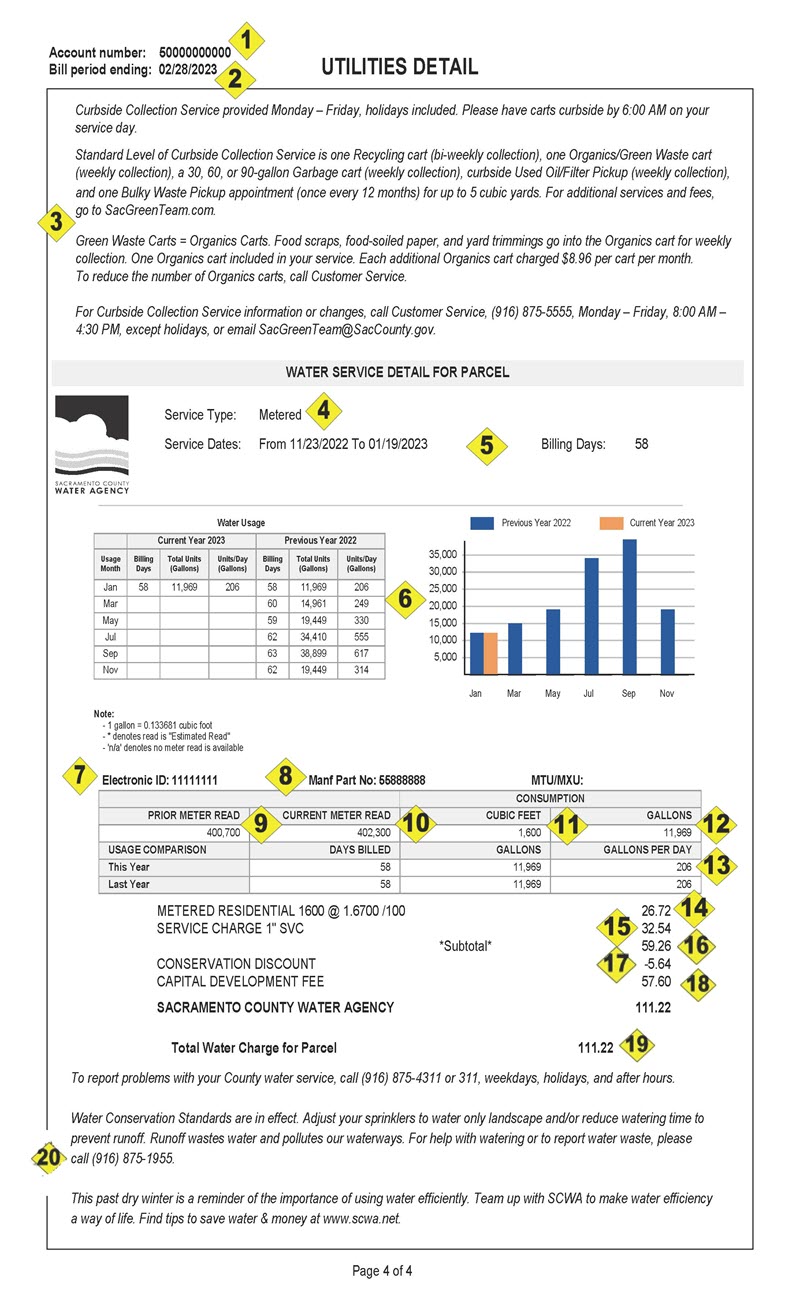
- Customer account number
- Bill Period End Date
- Waste Collection message area - this space may be used to provide important messages to our customers
- Type of Water service - Metered or Flat
- Date range of Water billing
- Identifier for reading meter electronically
- Physical meter serial number
- Metering information - your meter reading for the beginning of the billing period
- Metering information - your meter reading for the end of the billing period
- Consumption in cubic feet
- Consumption in gallons
- Average usage per day
- Water consumption charge
- Pipe charge
- Water usage discount
- Capital Development charge
- Calculated water charges for Parcel
- Total water charges for parcel after discount (if applicable)
- Water message area - this space may be used to provide important messages to our customers
Request a Billing History
Missing a bill? Need the last 12 months for your tax purposes? Have a dispute regarding your bill? Request a billing history.
A billing history provides you with:
- A list of your billed services – Refuse, Sewer, Stormwater Drainage, and/or Water
- A chronological history – Of the financial activities that have occurred on your account for the period of time requested
- The periods for the billed amounts – Which are financially broken down by service and presented with the due date.
- A running balance – which shows you what the balance was on any given date
How does it work?
When requesting your billing history, we recommend that your date range be a minimum of two months (to insure reportable activity on your account has occurred). Unless we detect something wrong with your request, you should receive your Billing History within 60 seconds.
Access the Billing History request form.
Paying Your Bill
Recurring
Why write a check? Pay your Sacramento County Consolidated Utility bills automatically with Electronic Funds Transfer (EFT).
Through the EFT program, your bill payment is deducted automatically from your checking or savings account:
- Saves You Time – no more checks to write or envelopes to stuff
- Saves You Money – no stamps means no postage costs or gas to drop your payment off in person
- Cutting Stress – no more worries about late payments or late fees
- Improving Security – electronic accounting documents your payments
To signup and start making payments through EFT, log into My Utilities. Select "My Profile" from the menu bar, then select "Auto Pay".
How does it work?
- You will still receive your regular utility bill, but it will be paid out of the checking or savings account you designate. Payments will be processed on or about your due date (if not on your due date, within 1 to 2 days before or after).
- Please continue paying your utility bill until you receive your confirmation e-mail stating that you are now on Electronic Funds Transfer.
- Proof of payment appears on your bank statement and on your next billing statement, so you will know how much you paid.
Want to stop EFT?
- Simple. Just call the Consolidated Utilities Billing & Service (916) 875-5555 and ask one of our representatives to cancel your Electronic Funds Transfer payments or log into My Utilities. Select "My Profile" from the menu bar, then select "Manage Bank Account". Note: EFT recurring payments post to utility accounts by 6:00 am on the Friday prior to the due date. If an EFT stop is requested after this time, the posting of the current payment cannot be stopped.
- Funds may not be drafted from a Credit Card or ATM Card.
One-Time
Paying your Sacramento County Consolidated Utility bill by using a One-Time Electronic Funds Transfer gives you the power to choose when and how much you wish to pay.
When you use "Pay now" on My Utilities, your bill payment is deducted within 1 to 2 business days from your checking or savings account automatically:
- Saves You Time – no more checks to write or envelopes to stuff
- Saves You Money – no stamps means no postage costs or gas to drop your payment off in person
- Cutting Stress – no more worries about late payments or late fees
- Improving Security – electronic accounting documents your payments
To initiate and make a one-time EFT payment, simply log into My Utilities. Select "Pay now" from the quick link menu bar on the right hand side of the screen.
How does it work?
- Once a "Pay now" request has been submitted, our systems import the data and perform validation checks to ensure the bank account details entered are compliant. If we detect any issues, we will respond via e-mail within 1-2 business day so that the issue can be rectified.
- If the data entered passes all validations, your account will be updated with the information entered and a confirmation e-mail sent to you confirming your request.
- The payment amount requested will be sent to your bank within 1 business day for withdrawal.
- Proof of payment appears on your bank statement and on your next billing statement, so you will know how much you paid.
E-Check
E-Check payments are accepted via phone or over the Internet. Our payment processor is Grant Street Group. You may use your personal checking, personal savings, business checking, or business savings account. (Not all banks participate in E-check. Verify your bank’s participation in this program.) There is no charge to the customer for using this option. Payments made via E-Check may take up to three business days to process and reflect in your account balance. PLEASE NOTE: The customer is responsible for the accuracy of bank account information entered. Inaccurate information entered by the customer may result in a returned payment fee of $53.
To make an e-check payment over the phone, please call 1-855-587-5779.
To make an e-check payment over the Internet, please click on: Grant Street e-check link. You will be directed to the Grant Street web site.
Credit Cards
Credit card payments are accepted via phone or over the Internet. Our payment processor is Grant Street Group. Visa, Master Card, Discover/Novus Card and American Express cards are accepted. To pay via the telephone or over the Internet, there will be a $4.95 processing fee added by Grant Street to the transaction. The maximum amount allowed when paying by credit card is $500.00 per transaction (exclusive of the processing fee). If you wish to pay more than $500.00 you will need to initiate additional transactions after a three day wait period between transactions. Payments made via credit cards may take up to three business days to process and reflect in your account balance.
To make a credit card payment over the phone, please call 1-855-587-5779.
To make a credit card payment over the Internet, please click here: Grant Street credit card link. You will be directed to the Grant Street web site.
Mail payment to:
Consolidated Utilities & Billing Services
P.O. Box 1804
Sacramento, CA 95812
To ensure proper credit please include the remittance stub included with your bill with your payment. If you do not have your remittance stub, please write your account number on your check.
Payments can be made in person at one of following locations:
Consolidated Utilities Billing & Service
10481 Armstrong Avenue
Mather, CA 95655
(Payment Counter is located on the first floor, Suite 100)
916-875-5555
Hours: Mon-Fri 8:00am - 4:30pm
Payment types: Cash, check and money order
Sacramento County Administration Building
700 H Street
Sacramento, CA 95814
916-875-5555
(Pay at the cashiers window located on the 1st floor)
Hours: Mon-Fri 8am - 5pm
Payment types: Cash, check and money order
Monthly Billing Option
The County of Sacramento Consolidated Utilities Billing & Service is happy to offer our customers a Monthly Billing Option!
In response to many requests, we now offer you the option of converting your bi-monthly (every 2 months) County Utilities bill to a monthly service bill for an additional charge of just 42 cents each month.
Fill out the secure online application. After you submit the form, you will be given the opportunity to sign up for Paperless Billing. If you choose to sign up for Paperless Billing, the 42 cents each month will be waived.
Rate Assistance
Get Your Account Balance
Submit a request to get your account balance sent to you via email or text message using your Utility Billing Account number
My Utilities
Access My Utilities to manage your Consolidated Utilities Billing & Services account(s)
You will need your current invoice with your account number and parcel number to establish a My Utilities profile.
My Utilities allows you to:
- Manage your bank account details
- Manage one-time or recurring payments
- Manage payment reminders
- Change your mailing address
- Set up paperless billing
- View bills and payments